Built to carry the load.

Radio traffic software that carries the whole station.

Orders, logs, as-run, a full CRM, contracts and invoicing. Plus the tools your DJs will actually open: show prep, live liners, live reads that bill like spots, and contests tracked from prize stock to winner. One program, one price, every feature, on your own computer.

No card. Nothing to cancel if you walk away.

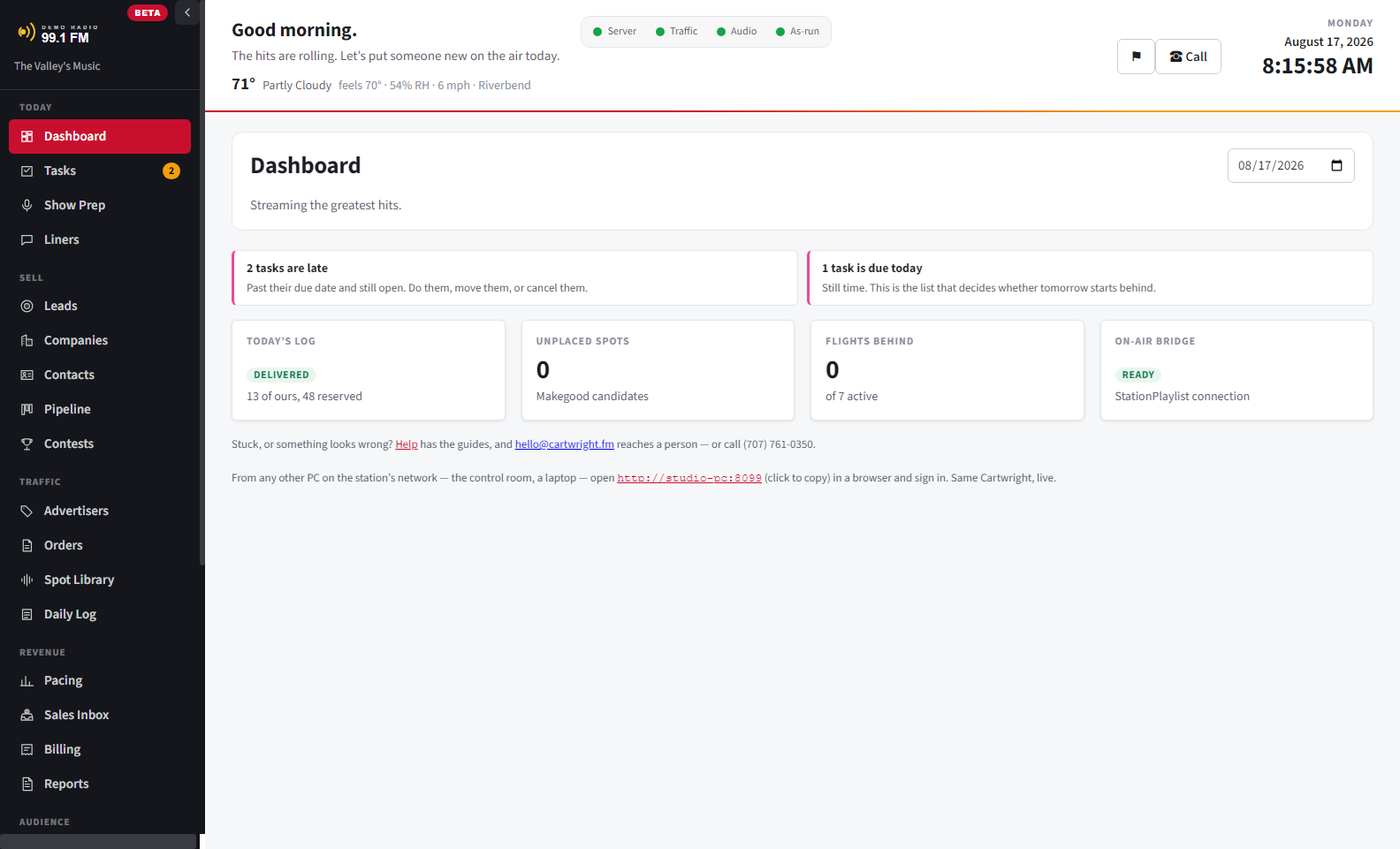
Cartwright's dashboard: today's log delivered, nothing unplaced, and no flights behind.

On the air today at Power88.FM, Solano County, California — every log, every liner, every invoice, since the day it was written.

Local stations shouldn’t have to choose.

The big traffic systems price for big markets and live entirely at the sales desk. The cheap tools cut everything that made the big ones worth having. Affordable and feature-rich were never supposed to be a choice — so Cartwright is the whole kit at one price: traffic, CRM, billing, and screens for the studio as well as the office.

It was built inside a working station, not a software company, and it runs that station's air every day. The log comes first. Nothing in this program — not billing, not the CRM, not a license check — is allowed to keep a station off the air.
The half the others forgot: your DJs.

Traffic software is usually bought for the office and resented in the studio. These screens are for the DJ — and they are the reason the rest of it gets used.

Show Prep that stays put

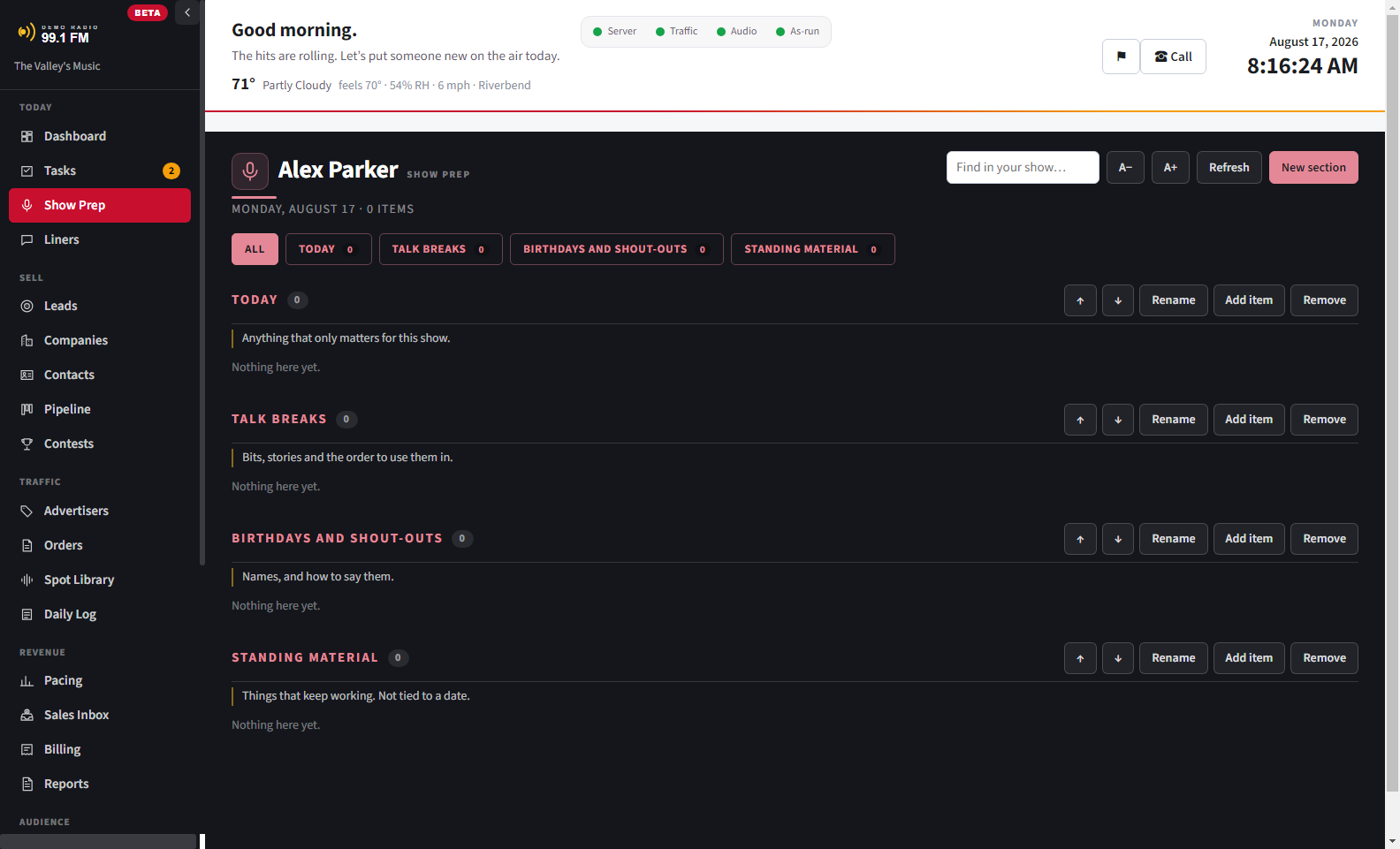
Show prep usually lives in a private document, on a laptop that isn’t in the studio. Here it’s on the computer already in front of the DJ: sections they arrange, a search box, and it’s still there next week.

Live Liners: the right words, right now

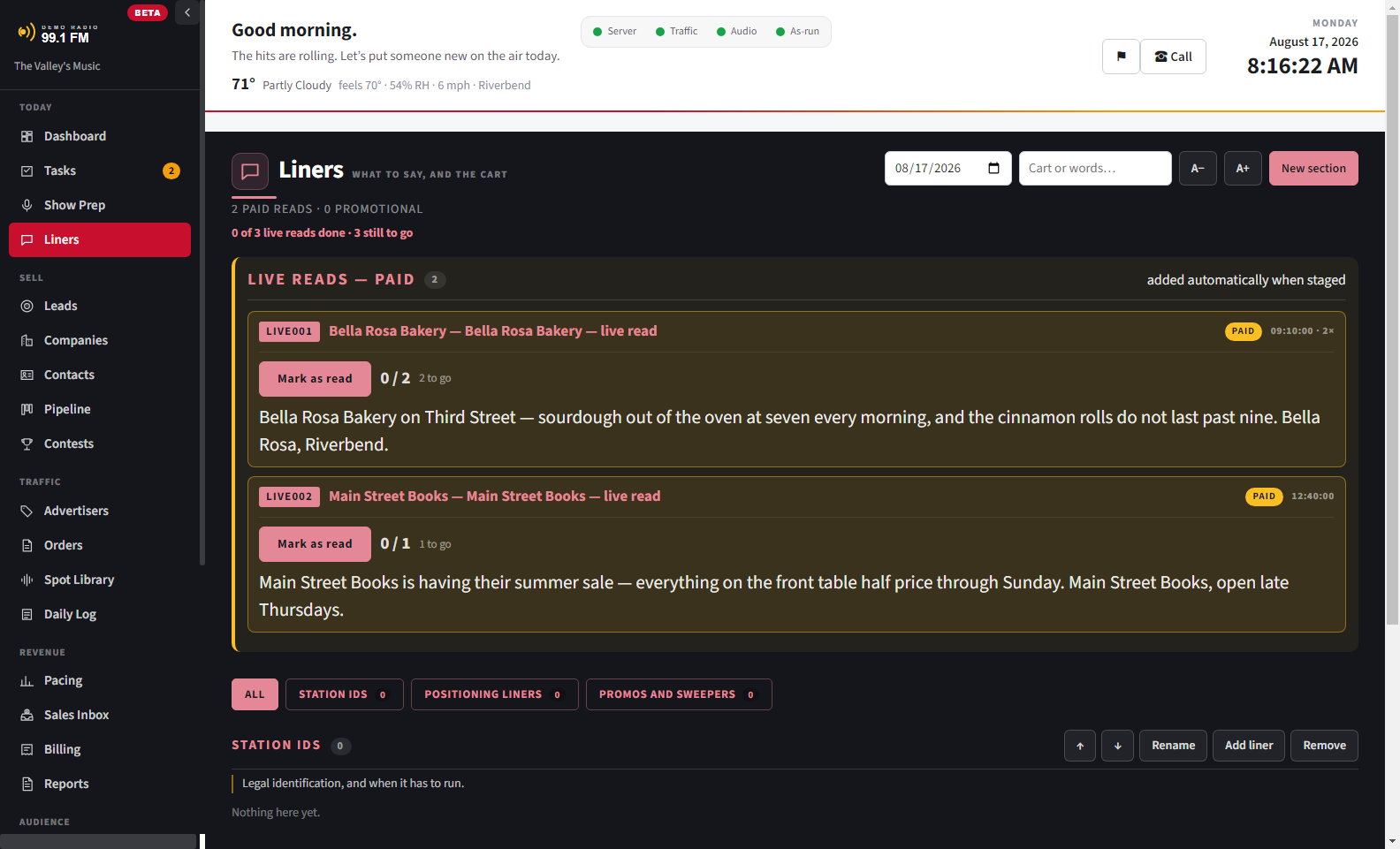
Promos, sponsor mentions, contest rules and station IDs, each one showing only between the dates it should run. No stack of printouts from a month ago, and nothing read on air that expired in March.

Live reads that get paid for

A live read reaches the DJ as a numbered cart in the automation they already watch. So it shows up in the as-run like any other spot, and gets reconciled and invoiced instead of taken on trust.

Contests the studio can actually run

Prizes counted down as they are won, the winner recorded on the spot, a warning before the same caller takes a third T-shirt, and each person’s yearly total watched against the tax-reporting limit. The office sets it up; the show just gives things away.

Arranged per person

The morning host and the salesperson share one computer and want different screens. Section order, and whether the menu shows words or icons, follow the person, not the computer.

In the studio without an install

Every other machine at the station opens Cartwright in a browser — same sign-ins, same data, live. The control room is a bookmark, not another computer to set up.

Show Prep: the DJ's own sections, arranged by them and still there next week.
Liners: today's live reads and giveaways, with the words to say.

Show Prep and Live Liners: prep the DJ arranges, and copy that shows up only between the dates it should run.

One month, end to end.

The same station across four screens, mid-month: what was sold, what the automation actually played, which campaigns are behind while there is still time to fix them, and the invoice that comes out of it. The station is made up — a real station’s advertisers are its own business, not ours to publish.

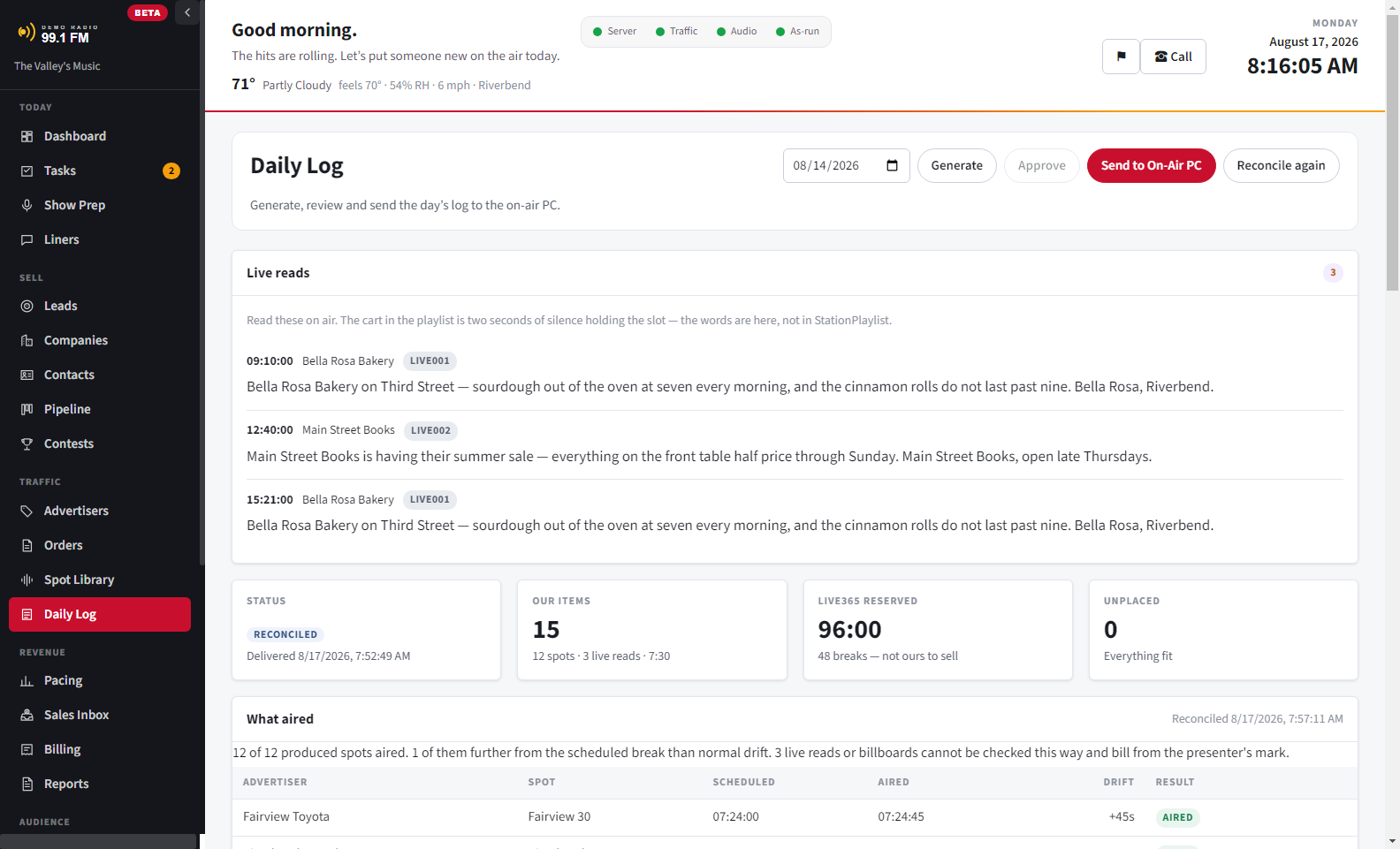
A day's log, reconciled: each spot's scheduled time, when it actually aired, and the drift between them.
A day’s log after it airs, with every spot matched against the automation’s own play history. Live reads are marked as live reads, because a silent cart can’t prove anyone spoke.
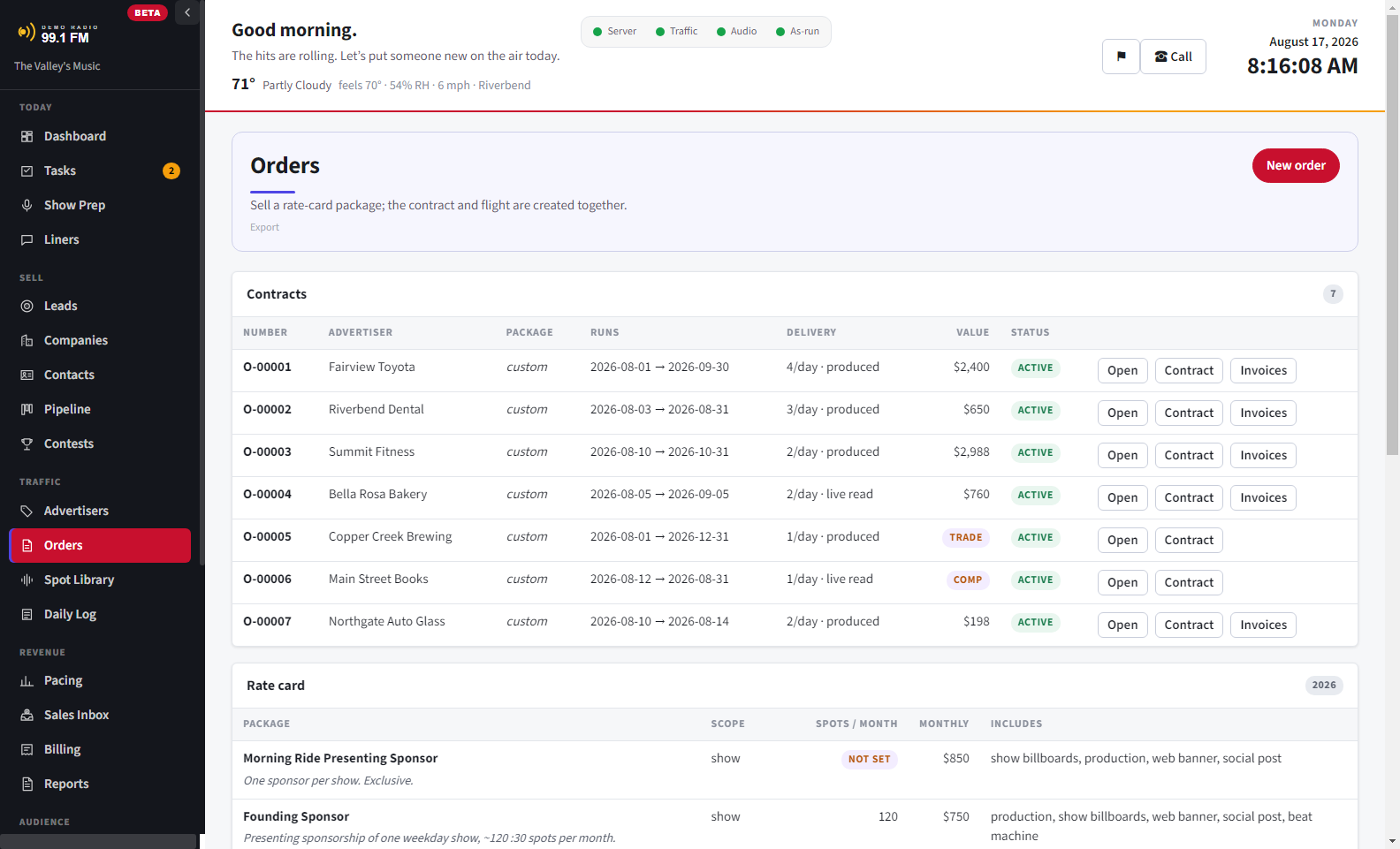
The orders list: seven contracts with their runs, delivery, value and status.
Orders, with the rate card underneath. Cash, trade and comp are different things, so they are kept separate.
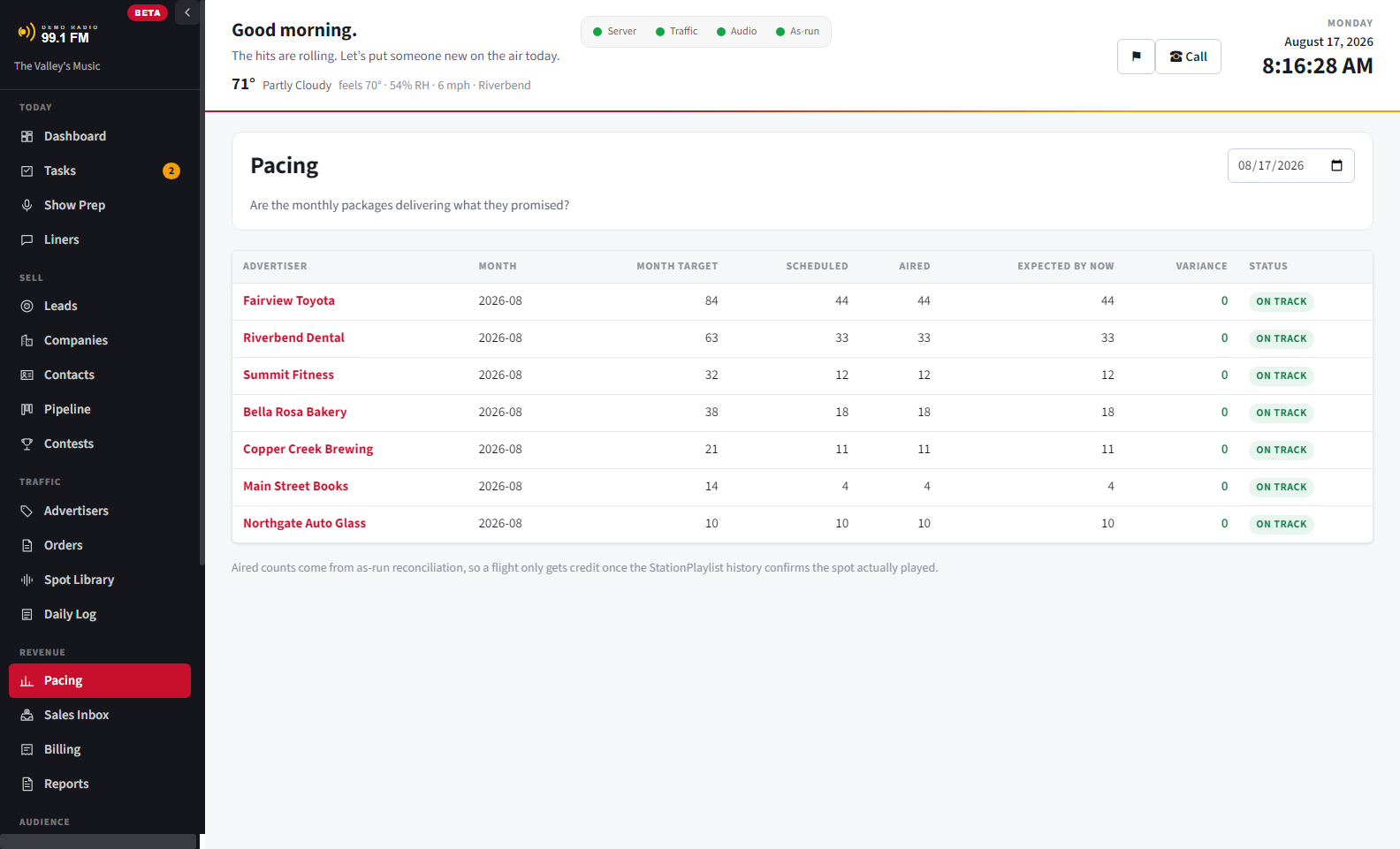
Pacing: each campaign against what was sold, with what is still owed.
Pacing, while a campaign can still be fixed. A flight running behind is a conversation with the advertiser this week, not a credit next month.
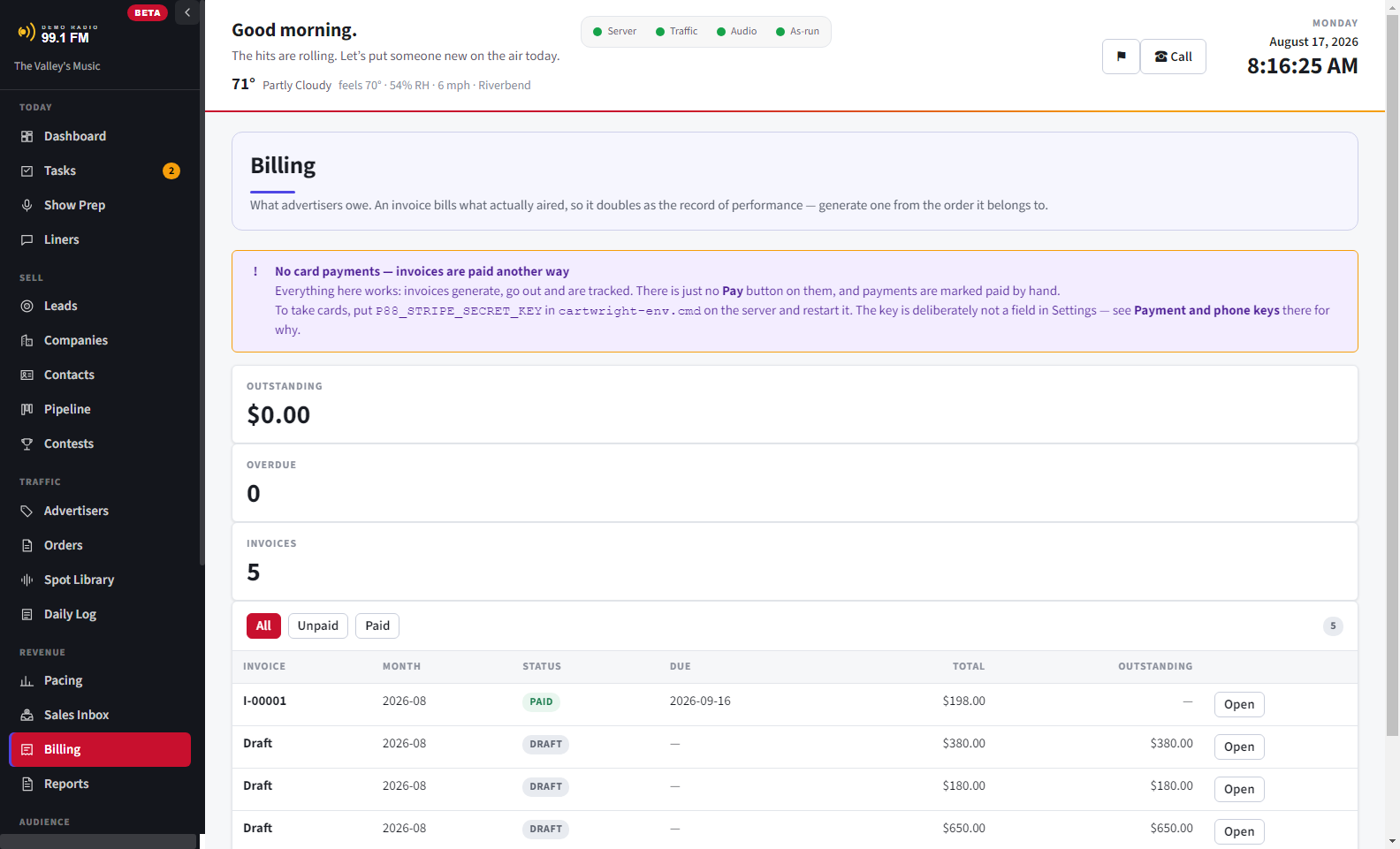
Billing: invoices with what was ordered against what aired.
An invoice bills what aired, not what was ordered, so it doubles as the affidavit. A day with no proof of what aired is not billed until someone decides what to do.

What it does

One program, two halves. Traffic is what goes to air. Sales is who is paying for it.

Orders and flights

Dates, spot counts, dayparts and pricing per line. Monthly, flat project price or per spot — and comp and trade are recorded as what they are, not as a rate of zero.

Scheduling that respects the hour

Your own clocks, your own break windows, and reserved network time set aside before anything is placed. Spots that won't fit are listed with a reason, never dropped.

A log the automation accepts

Saved into the folder your automation watches, in exactly the format it expects. Nothing ever writes to your automation's own database.

Clocks imported, not retyped

Your rotations and break windows come straight in from the automation's own files, previewed on screen before anything is saved — because thirty clocks is too many to type twice.

As-run reconciliation

Reads the play history back and matches it against what was scheduled, so what you invoice is what aired rather than what was sold.

Prospecting — who to call next

Search a town for businesses that could be advertising and aren't, and save the ones worth a call as leads. Each one is marked unverified on its own record, because a search result is a claim, not a fact.

A CRM that can't touch the log

Companies, contacts, leads, deals and tasks, in the same program — and built so it cannot reach the scheduler. A prospect is not an advertiser until they buy.

Contracts and invoices

Signed electronically, frozen once issued, and billed against what aired — so the invoice doubles as the affidavit of performance.

Built for more than one of you

When two people edit the same record, the second save is stopped with an explanation instead of quietly overwriting the first. Roles keep the studio out of the money and the money out of the studio.

Your station, not ours

Your name, your logo and your colors throughout, with a palette to start from if you would rather not choose. It runs on your machine and your data stays there.

Every deal, where it sits, and what it is worth

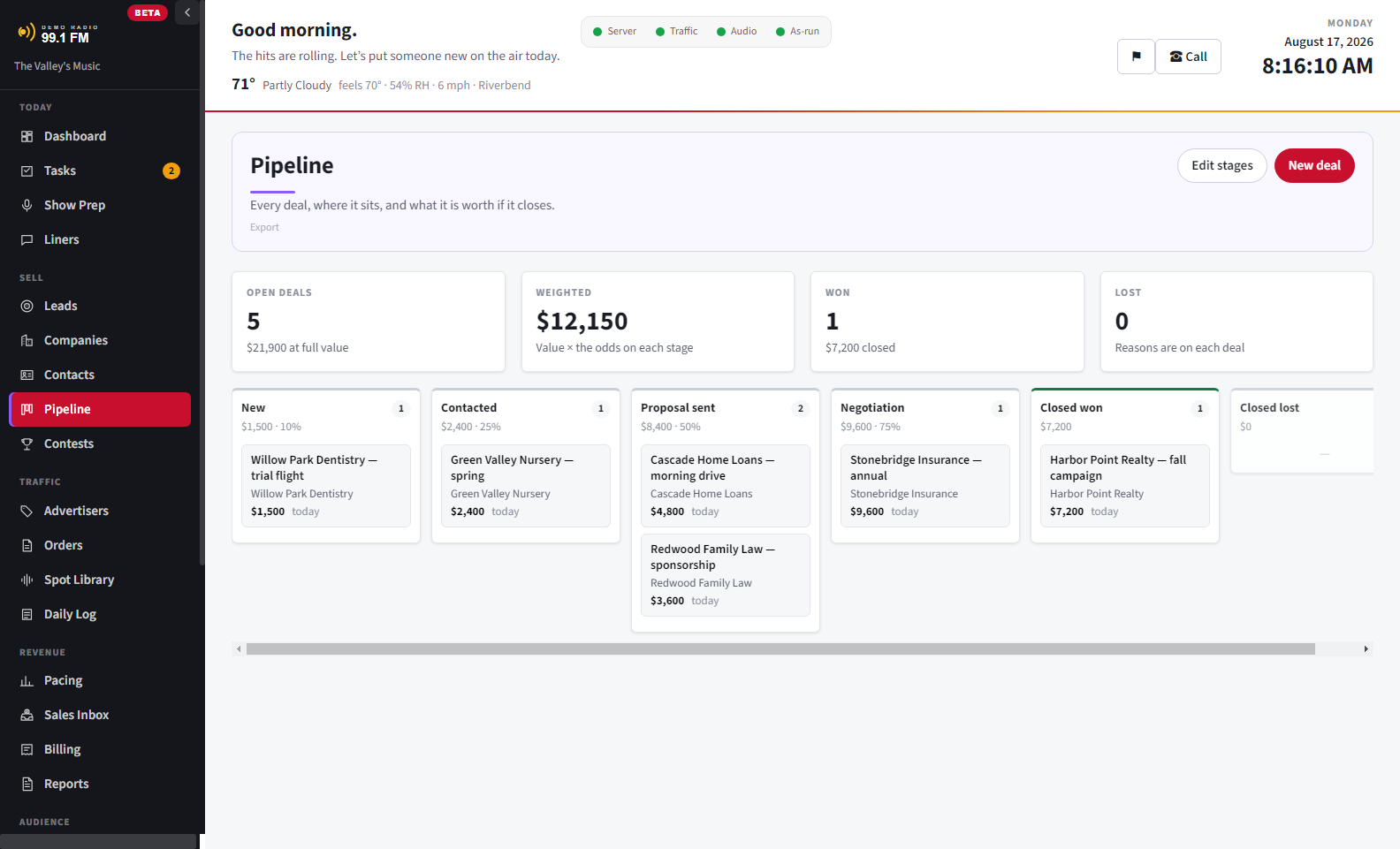
The board is your own: stages you name, in your order, with the odds you set. Time in each stage is recorded as deals move, because that is what shows a pipeline stalling, and it can't be pieced together later.

A won deal becomes an advertiser. A prospect never touches the scheduler — the one rule in this program that is enforced, not just agreed on.

The sales pipeline: deals by stage, with time in stage and a weighted forecast.

Pricing

One price per station. Every feature — the CRM, billing, the studio tools — with no seat counts, no per-user charges, and no modules to buy later. If you have priced the big-name traffic systems, this is the other end of that quote.

$79

per month

  • Everything, for one station
  • Cancel any month

$790Best value

per year — saves $158

  • Everything, for one station
  • Two months cheaper than paying monthly

Free

for 30 days

  • The whole thing, not a stripped-down version
  • No card, so nothing to cancel

Setup and training are free with your first subscription. We get Cartwright connected to your station and walk your staff through it, by phone or screen share. After that, call (707) 505-8885 and you reach the people who build Cartwright, here in California. No call center, no script, no ticket queue.

Start the trial

Questions stations ask

What does radio traffic software do?

It turns what a station sells into the daily log the automation system plays, then checks what actually aired so the invoice bills only that. Cartwright also keeps the sales pipeline and contracts in the same program.

Does Cartwright work with StationPlaylist?

Yes. It writes the traffic log into the folder StationPlaylist Creator watches and reads StationPlaylist Studio’s play history back to reconcile each day. No affiliation or endorsement is implied.

How much does Cartwright cost?

One price per station with every feature included: $79 a month, or $790 a year on the annual plan, which costs two months less. There are no per-seat charges or modules to buy later, and the first 30 days are free with no card.

Do you help us get set up?

Yes. Setup and training are free with your first subscription. We connect Cartwright to your automation system's folders, bring in your clocks, and walk your staff through building and sending their first log, by phone or screen share.

Who answers when we call for support?

The people who build Cartwright, here in California. Call (707) 505-8885 or email hello@cartwright.fm and you get somebody who knows the software and knows radio. No call center, no script, no ticket queue.

Is Cartwright a hosted service?

No. It installs on a Windows computer at the station, other computers on the station’s network use it in a browser, and the data stays on your machine.

Does it replace my automation system?

No. Cartwright writes a log your automation imports, and it never writes into the automation system’s own database.

What happens when a spot doesn’t air?

Reconciling the day against the play history marks the spot missed and opens a makegood the station owes back, so it is never billed as if it aired.

Choosing a system? What radio traffic software does and how to choose one. Running StationPlaylist? How Cartwright works with it.

This is a beta — Cartwright 0.24.0 Beta

One station runs Cartwright every day and has since it was written. That is one station, not a hundred, so read it that way: the parts that matter are proven on air every day, and you will find rough edges in the parts that aren't.

Buying now means a lower price than it will have later, and being asked what broke. If that isn't the deal you want, the trial costs nothing and the download isn't going anywhere.

What it works with

Cartwright writes a traffic log into the folder StationPlaylist Creator watches, and reads StationPlaylist Studio's play history back to reconcile it. It allows for reserved network time, including Live365 stop sets. Those products are named to describe what this connects to; no affiliation or endorsement is implied, and all trademarks belong to their owners.

Windows

The installer sets up Cartwright's server and starts it whenever the computer starts. The license covers two installed computers, and browsers on the station's network are unlimited.

Your data stays yours

The database is a single file on your machine. There is no cloud to be locked out of, and it keeps working if this website disappears.

Offline licensing

Your license key is checked on your own computer, with no need to reach us. An internet outage has never stopped a log from going to air.

Let us carry the load.

Thirty days, the whole program, no card. Put a real order on air this week. If it isn't right for your station, just close it — with no card on file, there is nothing to cancel.